
Home Widget Selection043.1.0 - Google Play
You'll be able to see results in few seconds.
Publisher Description
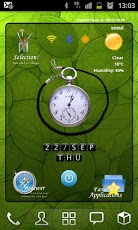
Here is new style home widget launcher Selection!.Load just 1 widget at your home screen, you can get beautifuldigital clock, google weather, network status, soft screenoffand small launcher.Each item(clock,favorite launcher and main links) have 3 themesand easy to change on setting screen.Features:- Include 4x4 size only.- Digital Clock (3 colors)- Analog Clock (2 style)- Digital Text Clock (Color changeable)- Main links Browser, Theme Setting, Weather and Favorite toggle. (3 style theme include) - Simple goole weather(3 days fore cast)- Small 12 favorite application launcher, you can change the links to other program. (3 style icon skins include)- Soft screenoff- Network status indicators. (Each icons link to setting programs)- Landscape screen included- Support English and Korean language.Add widget:1)Remove all widget and links on 1 page of your home.2)Hole on your homescreen3)Select "Widgets"4)Find "SFHome Widget Selection04"5)Click on it6)The widget will appear in your homescreen!**Note**- Home screen grid must 4x4 or large.- In case 4x5, 5x5 size, you can expand the widget.Button Actions:1. LeftTop Selection: Run widget setting program2. LeftBottom Browser: Run Browser 3. RightBottom Favorite : Toggle favorite view4. RightTop Weather Icon : Toggle forecast view Text of Weather Condition : Weather update manually5. Center Clock : Run Clock/Alarm program6. CenterBottom Power : Run softScreenoff7. CenterTop Wifi : Run setting Wifi8. CenterTop Bluetooth : Run setting Bluetooth9. CenterTop GPS : Run setting GPS10. Center of Application view : Toggle App1/App2Setting:1. Change Theme- Click selection icon on topleft side.- Select main icon style- Select clock color- Select favorite icon style2. Weather Setting- Click selection icon on topleft side.- Click Search Location- Enter city name and click "Find" button.- If the laocation found, then click "Save" button- Select update period- Select temperature unit3. Change favorite links- Click selection icon on topleft side.- Click Change application links- Select icons that you want to change- Select application that you want to use- Icon and name is changed to your selection. (program icons used. you can't change custom icons)- Back to the home screen** Note **Main links can change link only.You can't use program icons for them. Note:- Please exclude the widget from any task killers.- Weather update is needed maualy when reboot phone(just one time)- ScreenOff and On requred to refresh screen when home grid size change(just one time)- When widget first loading, program find the programs on the phone for favorite. If there is no programs, it appear "No App". You can change new program that you have.
About Home Widget Selection04
The company that develops Home Widget Selection04 is LargoGrave. The latest version released by its developer is 3.1.0.
To install Home Widget Selection04 on your Android device, just click the green Continue To App button above to start the installation process. The app is listed on our website since 2011-09-22 and was downloaded 0 times. We have already checked if the download link is safe, however for your own protection we recommend that you scan the downloaded app with your antivirus. Your antivirus may detect the Home Widget Selection04 as malware as malware if the download link to com.spforum.HomeWidget.Selection04 is broken.
How to install Home Widget Selection04 on your Android device:
- Click on the Continue To App button on our website. This will redirect you to Google Play.
- Once the Home Widget Selection04 is shown in the Google Play listing of your Android device, you can start its download and installation. Tap on the Install button located below the search bar and to the right of the app icon.
- A pop-up window with the permissions required by Home Widget Selection04 will be shown. Click on Accept to continue the process.
- Home Widget Selection04 will be downloaded onto your device, displaying a progress. Once the download completes, the installation will start and you'll get a notification after the installation is finished.
Program Details
System requirements
Download information
Pricing
Version History
version 3.1.0
posted on 2011-09-22
Several fixes and updates
version 3.1.0
posted on 2011-09-22
Disclaimer
Official Google Play Link
We do not host Home Widget Selection04 on our servers. We did not scan it for viruses, adware, spyware or other type of malware. This app is hosted by Google and passed their terms and conditions to be listed there. We recommend caution when installing it.
The Google Play link for Home Widget Selection04 is provided to you by apps112.com without any warranties, representations or guarantees of any kind, so access it at your own risk.
If you have questions regarding this particular app contact the publisher directly. For questions about the functionalities of apps112.com contact us.
